
Margill Law Interest Calculator is a powerful interest calculation, present value and indexation Web-based application specifically designed for the law profession. Users include hundreds of law firms, courts, government legal departments, trade unions, banks and accountants.
The software may be used in the US, Canada, Europe
The dollar ($) has been used in these examples, but any other currency (€, £, F, ¥, R, DA, Rs… etc.) may be used.
Most of the calculations below may use Fixed (unique interest rates) or Variable rates.
Real-life examples:
Over 100 pre and post judgment interest tables available for the US, Canada and Europe
Pre and post judgment – simple calculation
Pre and post judgment Interest (unique interest rate using the rate applicable at the start of the procedures among variable interest rates)
Interest following a judgment (unique interest rate)
Judgment collection including prejudgment interest and court fees that bear interest or not
Partial payments paid before the judgment
Collection of judgment awards by recurring payments
Late / unpaid salaries indexed according to an agreement
Late / unpaid and late rent
Hypothesis of a lump sum to be paid to the plaintiff instead of a structured settlement over time
Today value of an historical judgment (indexation)
Over 100 pre and post judgment interest tables available for the US, Canada and Europe
The rates are updated automatically in the system.
- US: Pre and post judgment rates for most US states, federal post-judgment rates, IRS rates, Prime rates
- Canada: legal rates for most provinces and territories, Revenue Canada rates, Prime rates
- Europe: Central bank rates, judgment rates for France, Belgium, Luxembourg
- Great-Britain, Australia, South Africa and Hong Kong central bank rates
See all the tables available at: https://www.margill.com/tables/interest-rate-tables-en.shtml
Pre and post judgment interest – simple calculation
Used to calculate the interest on a judgment. This can be pre judgment interest or post judgment whether the rate is fixed or the rates are variable.
Enter the judgment amount, the start and end dates, the rate(s) and Compute. Many other options too…
Input window :
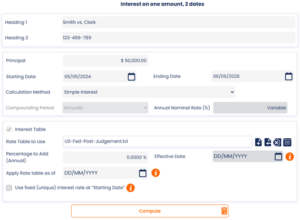
- Interest (x%) may be added or subtracted to the variable interest rates indicated in the interest table created – use: Percentage to Add (Annual).
- The “Apply Rate table as of” option applies a 0% interest rate until this date unless a “Percentage to Add (Annual)” rate is entered in which case this rate will apply (rare situation)
- This added (or subtracted) interest rate can take effect at any time during the calculation – “Effective Date”.
- Most of the time, interest is Simple interest (no interest on interest) although Compound interest can be used.
- Simple interest may also be capitalized (compounded) at the “anniversary” date. So, interest now bears interest annually, quarterly, monthly, weekly, etc.
- Use these icons
 to choose any interest rate table among over 100 legal interest tables, central bank rates or create your very own
 - In some jurisdictions, the interest rate to be used is the rate at the start of the proceedings. Simply check:

- If the rate is a fixed rate, enter the interest rate, no need for an interest table.
- Specify the currency and date format under Settings.
Results window:
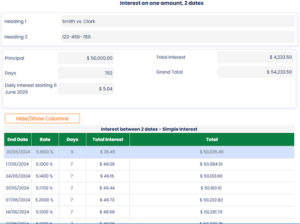
- Can divide the Total Interest in a fixed rate portion and a variable rate (not shown in example).
- For example, when the rate is 7%, 5% could be the legal (or contractual interest) and 2% an additional indemnity. If the rate was 9%, the additional indemnity would be 4%.
- Results may be printed in a concise report.
- Per diem (daily interest) is calculated based on judgment amount (Simple interest) or balance (Compound interest).
- The calculation may be saved and will appear in your “Recent files”.
Pre and post judgment interest (unique interest rate using the rate applicable at the start of the procedures among variable interest rates)
Input window:
Simply check the box to use the rate at the Start Date. In this example, the rate on 05-05-2024 is 5.3%, thus the whole calculation will use 5.3% even if rates change afterwards.
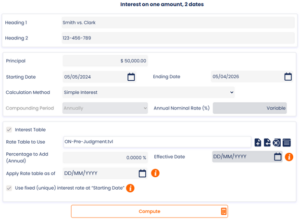
We see this type of special calculation in Ontario, Canada judgments.
Results screen:
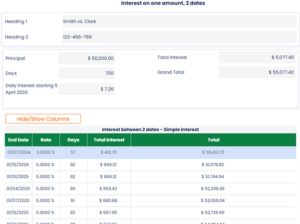
Interest following a judgment (unique interest rate)
Input window:
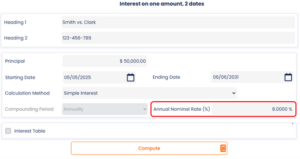
The same features are available as those in the previous section with variable interest rates.
Results window:
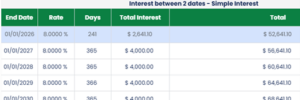
Judgment collection including Prejudgment interest and Court fees that bear interest or not
This highly sophisticated module offers a unique tool to easily collect judgment awards when Prejudgment interest is already computed and/or Court fees are included in the amount due to the plaintiff.
Calculations can be done using Simple or Compound (or capitalized) interest.
For more information on the various interest methods, consult our White Paper on interest Calculation.
Example:
- Collection of a $75,000 judgment including Prejudgment interest (already computed) and Court fees
- Post judgment rates are variable (Texas rates in this example)
- Defendant agrees to pay $2,000 per month but does not respect this schedule (unpaid, late, partial payments)
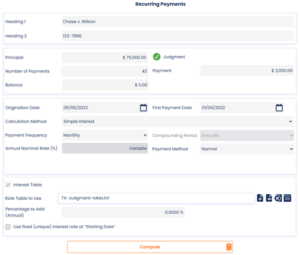
- Include $6,000 Court fees and $5,000 Prejudgment interest (no interest on these). This is easily entered with the Judgment link above (a green check appears once the Judgment module is activated).
- Interest can also be added on these amounts. Court fees can be added at the Origination date or later on, at any time in the resulting schedule.
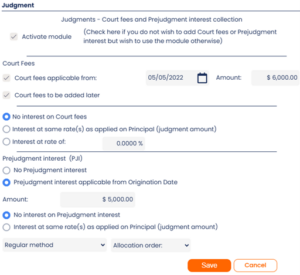
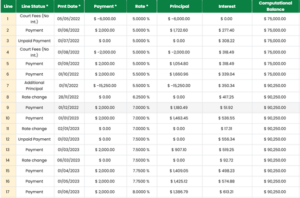
- Press on Compute and if the defendant pays according to schedule, 47 payments will be required to refund the judgment award that includes Post judgment simple interest; Court fees (no interest) and Pre judgment interest (no interest)
- There is also a second part to the judgment ($15,250) with interest starting only on 01/11/2022
- Various events are included and updated over time: missed payments, partial payments, returned checks, fees (no interest) new Court fees ($1000)(see Line Status that reflects what is charged and when, and the Comments column in the schedule)
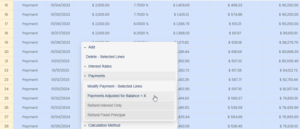
- Starting 04/01/2023, we decide to recompute the equal payments to repay the total amount owed in 38 months. Highlight the lines, right click of the mouse (or Actions) and Payments > Payments Adjusted for Balance = X, where X= 0.
Final result:
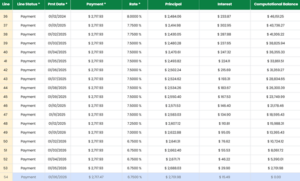
Margill can include just about any repayment scenario however complex!
When the Judgment module is activated, Margill will respect the default or personalized refund/ allocation order:
- Interest on Court fees
- Interest on Prejudgment interest
- Interest on Other fees
- Interest on Principal
- Court fees
- Prejudgment interest
- Other fees
- Principal
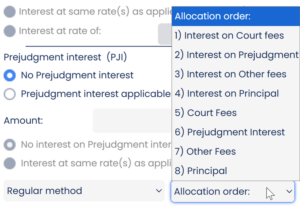
New refund / allocation orders can be added in the Margill calculator under Settings (Law version only) by the Margill administrator only. For example, in some special cases, fees or principal could be paid before interest.
When the Judgment module is activated, the Payment schedule includes over 40 columns that show what amount is paid when, balances, etc. The columns include a split between Principal (judgment amount), Prejudgment interest, Court Fees and Other Fees.
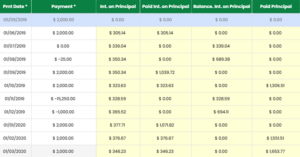
Some of the columns available when scrolling to the right (when Judgment module is activated)
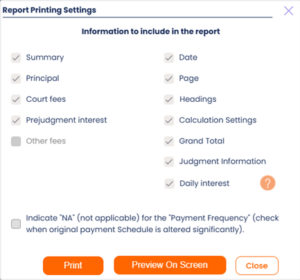
The reports include the summary schedule as well as separate sections for Principal, Court fees, Prejudgment interest and Other fees. The Per diem or Daily interest can also be included in the report.
Partial payments paid before the judgment
In our example :
$50,000 judgment in which the defendant has made 3 payments before the judgment. What is the total interest due at the judgment date?
Use the Recurring payments (Amortization) calculation and Irregular payments. You will then be able to build your schedule. Simple or compound interest could be used. In this example, simple interest is used (Advanced icon).
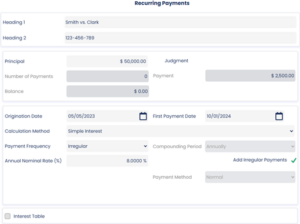
Three payments before judgment: January 10, 2024, June 26, 2024 and November 11, 2024. Had there been dozens of payments, these could have been imported via a simple Excel sheet with the date in column A, the amount in column B and an optional Comment int column C.

You must add each payment in the table (initially empty – “Period of Payments” being “Irregular”) to calculate the balance due and interest in the Results window. The judgment is pronounced on May 15, 2025, so a line is added on this date providing the balance on judgment date.
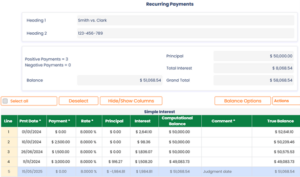
The defendant owes the plaintiff $51,068.54 on the day of the judgment.
The judge may also decide to award various amounts at certain moments in time. In this case, insert negative amounts in the “Payment” column.
In the example below, we will see how to calculate the interest if the defendant (now debtor) agrees to pay what is owed at $6000 per month.
Collection of judgment awards by recurring payments
As we saw above, the defendant owes the plaintiff $51,068.54 on the day of the judgment.
Two approaches are possible:
1) Continue the above calculation (nice and neat to have all in one calculation). However, since we are using simple interest, the outstanding interest (prejudgment interest) will not bear interest.
In our example, the debtor pays $6000 on the first of each month. These amounts, the payment frequencies and the interest rates can be changed. Also, if payments are missed, these can be added to the schedule and the table is recalculated.
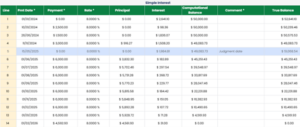
2) Create a new payment schedule using the $51,068.54 balance on the day of the judgment in the Recurring Payments (Amortization) calculation. Interest will thus be charged on the interest, increasing the total amount due (more interest than in option1). The schedule can also be saved and edited over time.
Late / unpaid salaries indexed according to an agreement
Use the “Arrears” calculation. See the Late / unpaid Salaries, Rent, Alimony page.
Late / unpaid and late rent
Use the “Arrears” calculation. See the Late / unpaid Salaries, Rent, Alimony page.
Hypothesis of a lump sum to be paid to the plaintiff instead of a structured settlement over time
This is a fictional example with more or less arbitrary numbers to demonstrate how Margill can help:
The plaintiff (20 years old) was seriously injured as a student in university. He will not be able to work for the rest of his life. What lump sum should be paid today instead of a structured settlement, taking into account his revenue today as a student, as a worker and upon retirement? His total life expectancy would be 55 years (660monts).
- Revenue as a student is estimated at $2000 per month (for 2 years / 24 months). No wage growth.
- As a worker, his salary would be $80 000 a year ($6667 per month) up until 65 (for 43 years / 516 months)). We assume a wage growth of 2%.
- Upon retirement, the yearly revenue falls to $50 000 in today dollars but indexed at 2.0% per year (10 years / 120 months). $50,000 in 45 years would be worth approximately $124,330 ($10,360 per month) with 2% yearly inflation (wage growth). We used the Indexation calculation (under Other Calculations) to figure this out:
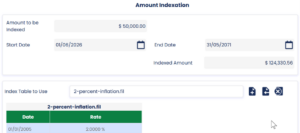
Amount indexed to calculate the future value of retirement income
Let’s now do our calculation… We’ll first enter the most prominent monthly installments (when our plaintiff would be of working age) and then change the monthly installment amounts manually for when he was a student and finally when he would retire. Since life expectancy is 55 years, we entered 660 months.
We entered a 3% discount rate. The actual discount rate is often fixed by law. The wage growth is slightly theoretical and we only entered wage growth during working years (not while in university or at retirement). We could have entered wage growth outside working years but a more manual process would have been required (each year’s monthly revenue would have had to be calculated manually as opposed to automatically by Margill as is done during working years).
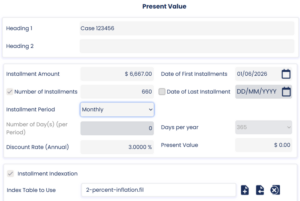
After entering the above, press on Compute and the Present value will be calculated based on a $6667 installment. This amount is not the final PV required since we must factor in university and retirement revenue.
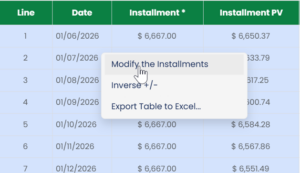
We changed the installments for 24 months to $2000 manually but in bulk with the right mouse click, in the Present Value table).
Below are the results of the total present value but showing only the significant cash flow changes:
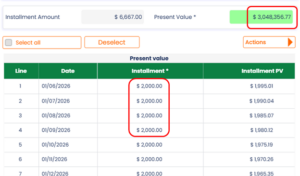
University revenue for 2 years
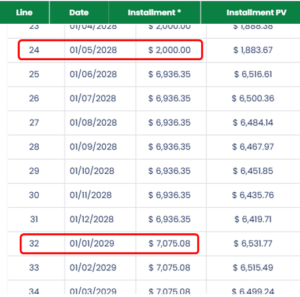
Month 24 at $2000, then salary at
2% yearly inflation (salary indexation)
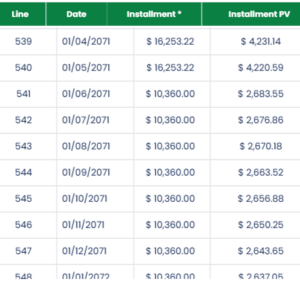
Retirement age as of line 541 – amounts changed manually in bulk
but no indexation amounts
With a 3% discount rate (the discount rate may be fixed by law), the plaintiff should receive $3.048 million as a lump sum. This amount might be lower than in real-life cases since we did not index university and retirement income.

Notice the low present value of amounts in the distant future:
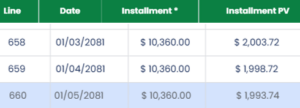
The Present Value calculation can also be used to calculate structured settlement amounts by entering the present value amount and letting Margill calculate the installment amount over time.
Today value of an historical judgment (indexation)
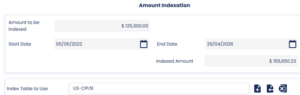
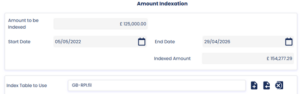
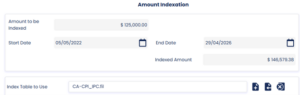
What is the value TODAY of a 2022 judgment of $125 000?
In the US: $155,650.23
In Great-Britain: £154,277.29
In Canada: $146,579.38
The above calculations and more can all be done with the Margill Web Calculator, Law Edition. Try the Calculator on line for 30 days at no cost.